
Why My “Crazy” Microsoft Outlook Email Folders Are the Reason I Stay Sane in Construction
- TUFSM

- Jul 31
- 3 min read
People laugh at me for my email folders. Honestly — proper belly laughs. My boss took the piss the other day: “Have you seen Sophie’s inbox? She’s got a folder for everything.”
And he’s right. I do. Because it works.
We’ve got around fifteen jobs on the go at the moment. Fifteen different clients, scopes, variations, suppliers, drawings, problems, and personalities. If I tried to run all of that from one chaotic inbox, I’d be finished. So I don’t. I have a folder for every single job, plus folders for suppliers, materials, internal departments — the lot. If an email comes in, it gets filed. Sent items too. Everything.
People think it’s “extra admin.” It’s not. It’s survival.
The truth is: most people cannot use email subjects properly.
Half the industry will reply to a thread about joist layouts with a subject line that says “RE: Thanks.” Or they never change the subject halfway through a conversation, even when the thread is now on a new subject. Or they’ll start a brand‑new thread about something that should’ve stayed in the original chain.
If you rely on subject lines to find anything, you’re done for.
My folders fix that. If it’s about Job A, it goes in Job A. Materials for each jobs goes into correct folder. If it’s about a supplier, it goes in their folder. When I need the full audit trail, I don’t have to dig through sent items, inbox, and random threads — it’s all sitting together, tidy, waiting for me.
And here’s the part people don’t expect: I file Microsoft Outlook emails even when I haven’t read them.
If I know something isn’t urgent, I shove it straight into the right folder. Then, when I’ve got an hour to sit down with a coffee and update OneNote, I open that folder and work through the emails one job at a time. No distractions. No jumping between fifteen different projects. No mental whiplash.
It’s the difference between reactive chaos and proactive control.
This job is the first time I’ve had this many folders — and I wasn’t sure it would work.
When I was a site manager, my folders were simple: Health & Safety, Quality, Techanical, Sales, Commercial and customer service. Straightforward.
But as a subcontractor? You need crazy folders. You need structure. You need a system that protects you when someone says, “Can you send me all the emails about that variation?” and you can pull them up in seconds. The subject of that email might be so stupid code some one made up and only make sense to them and you'll never be able to search for it, unless you're rain man!
And that’s exactly what happens. My boss might laugh at the folders — but he doesn’t laugh when I can find every email from a project manager who changed the subject line three times. He doesn’t laugh when I can produce the full audit trail without scrolling through 100 scattered emails. He doesn’t laugh when I can prove what was said, when, and by who.
The best part? Searching becomes effortless.
If I’m working with a project manager, I just type their name into the search bar, drag every email into the right folder, and boom — the whole story is there. Clean. Organised. Bulletproof.
Email folders aren’t admin. They’re a tool.
They save time. They save stress. They save your arse.
And in an industry where communication is messy, subject lines are chaos, and everyone is juggling ten things at once, having a system that brings order to the madness isn’t “extra.” It’s essential.
So yes — I have crazy folders. And yes — they work.
If your inbox is currently a battlefield of half‑read threads, random subject lines, and fifteen jobs fighting for attention, do yourself a favour. Bring some order into the chaos.
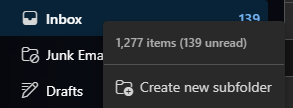
Right‑click that inbox, hit “Create new subfolder”, and drag every relevant email into it. One job, one folder.
One supplier, one folder.
One department, one folder.
It takes seconds — and it will save you hours.
Because in construction, clarity isn’t a luxury. It’s a tool. And this one is free.


Comments